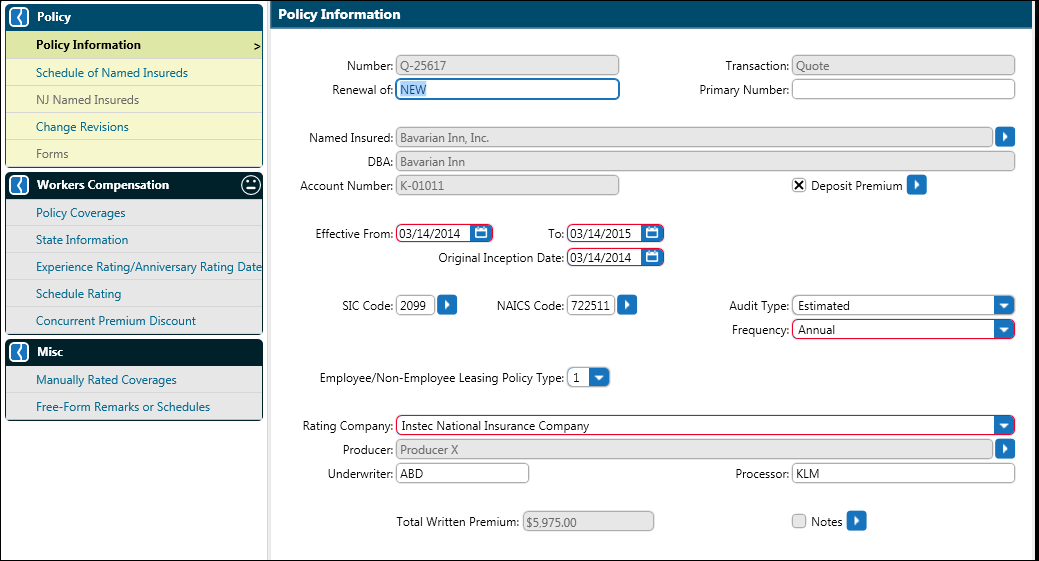
Click the Named Insured arrow to open the Named Insured dialog box. If some or all of the Named Insured information is the same as the Account Information, check the ‘Use Account Information’ check box to pre-fill the dialog box. When this check box is checked, all fields except the Named Insured are read only. To open the fields for further editing, uncheck the ‘Use Account Information’ check box. The account information is retained but the fields are opened for editing.
Effective From and Original Inception Date default to today’s calendar date. Either date may be changed. The Effective To date defaults to one year from the Effective From date.
If a deposit premium factor or amount is applicable, this may be input in the optional Deposit Premium dialog.
Select the SIC Code and NAICS Code from the list.
Select Audit Type and Frequency from the list.
Select the Employee/Non-Employee Leasing Policy Type from the list.
A Rating Company is required for rating a transaction and is selected from the list provided.
The Producer field identifies the Producer associated with the policy and is also selected from the list. Click OK.
Underwriter and Notes are optionally entered.
Proceed
to the Schedule of Named Insureds screen.